
Wanderlust Parallax Webpage
HTMLCSS3JS
Wanderlust Parallax Webpage
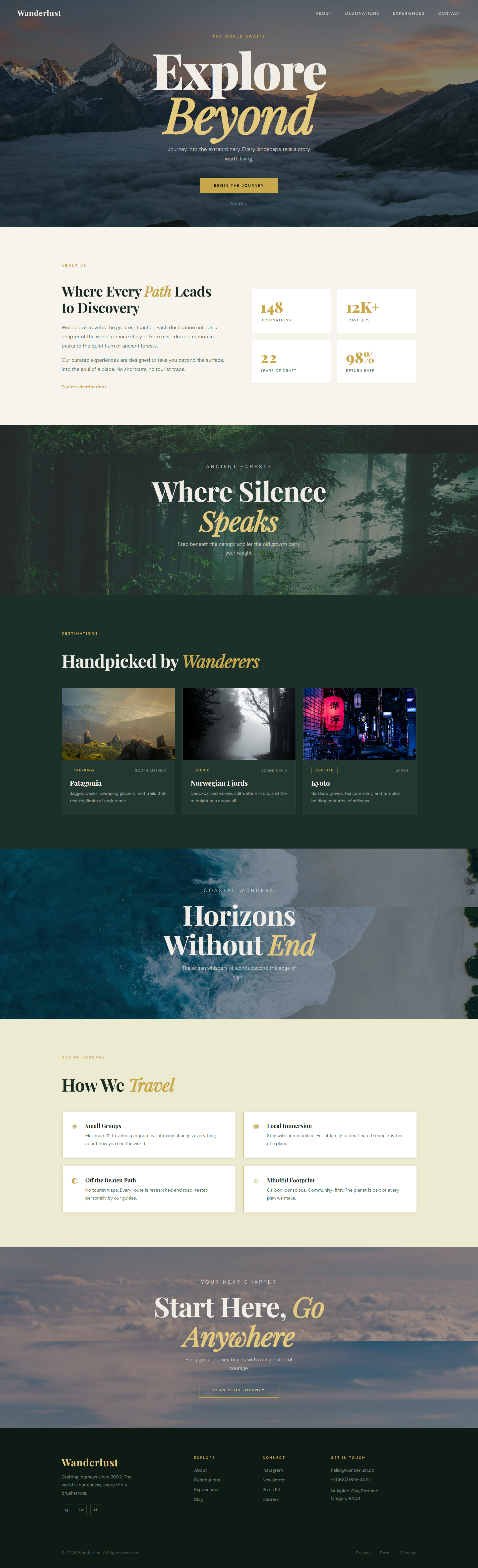
A responsive travel landing page built with HTML, CSS, and JavaScript. The design uses full-screen parallax sections, layered overlays, animated counters, fade-in reveals, and a mobile navigation drawer to create a cinematic scrolling experience.
Features
- Full-screen parallax hero, destination, and contact sections
- Scroll progress indicator and active navigation highlighting
- Animated stats counters triggered on scroll
- Fade-in content reveals with subtle staggered timing
- Responsive navigation with a mobile hamburger menu
- Clean travel-inspired visual system with warm greens and gold accents
Files
index.html- page structure and contentstyles.css- all layout, visual styling, and responsive rulesscript.js- scroll interactions, counters, parallax depth, and menu behavior
How to Run
- Open the
Parallax Webpagefolder in VS Code. - Open
index.htmlin your browser. - Scroll through the page to see the parallax motion and scroll-triggered animations.
If you use a live server extension, you can also launch the page from VS Code for automatic refresh while editing.
Customization Ideas
- Replace the background images with your own destinations
- Update copy, brand name, and contact details to fit your project
- Adjust the color palette in
styles.cssto create a different mood - Add more destination cards or sections if you want a longer landing page
Browser Notes
The page is designed to work well on modern desktop and mobile browsers. On mobile, the parallax background attachment falls back to a standard scroll experience for compatibility.