Interactive Price Range Slider
Interactive Price Range Slider

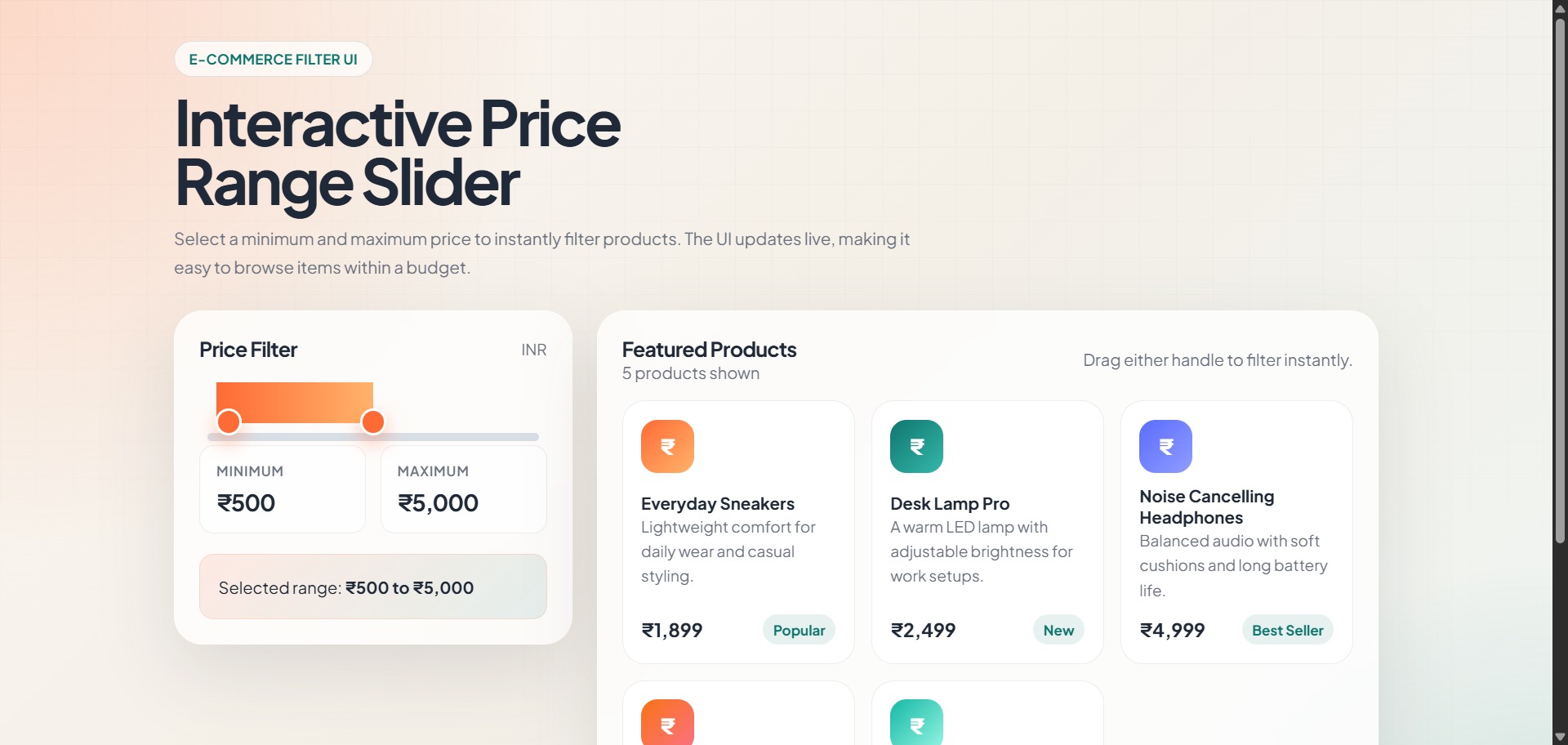
A modern, interactive price range slider UI component for e-commerce applications. This project demonstrates a smooth, real-time product filtering experience using dual range inputs with live updates.
🎯 Features
- Dual Range Sliders: Intuitive minimum and maximum price selection
- Real-Time Filtering: Products filter instantly as you adjust the sliders
- Live Price Display: Shows selected price range with INR currency formatting
- Product Count: Dynamic product counter updates based on selected range
- Empty State Handling: User-friendly message when no products match the filter
- Smooth Animations: Hover effects and transitions for enhanced UX
- Fully Responsive: Mobile, tablet, and desktop optimized
- Accessibility: Proper ARIA labels for screen readers
🚀 Demo
The application displays a curated product catalog with:
- 6 sample products ranging from ₹1,499 to ₹8,999
- Products include sneakers, lamps, headphones, water bottles, office chairs, and backpacks
- Beautiful gradient icons and product cards with tags (Popular, New, Best Seller, etc.)
🛠️ Tech Stack
- HTML5: Semantic markup with accessibility features
- CSS3: Modern styling with CSS Grid, Flexbox, and CSS variables
- Vanilla JavaScript: Pure ES6 module without frameworks or dependencies
- Fonts: Plus Jakarta Sans from Google Fonts
📂 Project Structure
price-range-slider/
├── index.html          # Main HTML markup with semantic structure
├── css/
│   └── style.css      # Styling with responsive design
├── js/
│   └── script.js      # Product filtering logic (ES6 module)
└── README.md          # This file
🎨 How It Works
Range Slider
- Two synchronized range inputs allow users to select minimum and maximum prices
- The filled track (gradient bar) visually represents the selected range
- Prevents minimum from exceeding maximum and vice versa
Product Filtering
- User adjusts either slider handle
- JavaScript clamps values to stay within valid range
- Display updates with formatted prices (e.g., "₹500 to ₹5000")
- Product grid filters in real-time, showing only items within range
- Product count updates dynamically
- Empty state appears if no products match
Dynamic Updates
- Price Display: Formatted using
Intl.NumberFormatfor Indian rupees - Product Count: Singular "product" vs plural "products"
- Visual Feedback: Track fill width and position update smoothly
- Accessibility: ARIA labels describe min/max inputs
📱 Responsive Design
- Desktop: Full two-column layout with filter panel and product grid
- Tablet (≤900px): Single column stacked layout
- Mobile (≤640px): Optimized typography and spacing, single-column price values
🚀 Getting Started
Prerequisites
- Modern web browser (Chrome, Firefox, Safari, Edge)
- Local development server (optional but recommended)
Installation
- Clone or download the project:
git clone https://github.com/kushalkumar-shaw/price-range-slider.git
cd price-range-slider
- Serve with your preferred local server:
# Using Python
python -m http.server 8000

# Using Node.js http-server
npx http-server

# Or open index.html directly in your browser
- Open
http://localhost:8000in your browser
💡 Usage
- Adjust Minimum Price: Drag the left slider handle or click the min range input
- Adjust Maximum Price: Drag the right slider handle or click the max range input
- View Results: Products update instantly in the grid below
- Check Summary: See the selected price range and product count at the top
🎯 Key Code Highlights
Price Formatting
const formatter = new Intl.NumberFormat('en-IN', {
  style: 'currency',
  currency: 'INR',
  maximumFractionDigits: 0,
});
Value Clamping Logic
Ensures minimum never exceeds maximum and stays within valid range (₹0 - ₹10,000).
Product Filtering
Filters products by checking if price falls within selected range, then updates visibility and count.
🎨 Styling Features
- Color Scheme: Warm tones with orange primary (#ff6b35) and teal secondary (#0f766e)
- Design System: CSS variables for consistent theming
- Backdrop Blur: Glass-morphic panels with blur effect
- Gradient Backgrounds: Radial and linear gradients for depth
- Grid Background: Subtle grid pattern overlay for visual interest
♿ Accessibility
- Semantic HTML with proper heading hierarchy
- ARIA labels on range inputs
- Keyboard navigable sliders
- Clear visual feedback on focus and hover states
- Sufficient color contrast for readability
📦 Sample Products
The project includes 6 demo products:
- Everyday Sneakers - ₹1,899
- Desk Lamp Pro - ₹2,499
- Noise Cancelling Headphones - ₹4,999
- Smart Water Bottle - ₹1,499
- Office Chair - ₹8,999
- Travel Backpack - ₹3,299
🔧 Customization
Add More Products
Edit the products array in js/script.js to add more items:
const products = [
  {
    name: 'Product Name',
    price: 2999,
    tag: 'Tag',
    color: 'linear-gradient(135deg, #color1, #color2)',
    description: 'Product description',
  },
  // ... more products
];
Adjust Price Range
Change the min, max, and step attributes in the range inputs (index.html):
<input class="range-input" id="minRange" type="range" min="0" max="10000" step="100">
Change Currency
Modify the formatter in js/script.js:
const formatter = new Intl.NumberFormat('en-US', {
  style: 'currency',
  currency: 'USD',
  maximumFractionDigits: 0,
});
🌟 Future Enhancements
- Multiple filter options (category, rating, brand)
- URL-based filter persistence
- Filter history/presets
- Add to cart functionality
- Product sorting options
- Filter animations and transitions
📄 License
This project is open source and available under the MIT License.
🤝 Contributing
Contributions are welcome! Feel free to:
- Report bugs
- Suggest improvements
- Submit pull requests
👤 Author
Created with ❤️ by Kushalkumar Shaw